
AI tools for creating classroom activities — such as ChatGPT, Teachy, and Canva — generate exercises, assessments, and interactive tasks from teacher-written prompts. For results aligned to Common Core or state standards, the key is using specific prompts that include grade level, learning standard, and desired format — and always applying pedagogical review before bringing anything into the classroom.
The average teacher spends 7+ hours a week on lesson prep — and doesn't have to anymore
A 2024 RAND Corporation survey found that U.S. teachers work an average of 53 hours per week, with a significant share of that time consumed by planning, grading, and administrative tasks outside direct instruction. Building assessments, designing differentiated worksheets, adapting materials for students with IEPs or 504 plans — all of it eats into the hours that could go toward what actually matters: teaching, mentoring, and reaching every student.
The pressure multiplies when you teach multiple preps or work across grade levels. Creating a 7th-grade math quiz, adapting the same quiz for a student with dyslexia in 6th grade, and designing a review activity for your 9th-grade Algebra class can consume an entire Sunday. A middle school math teacher in a suburban district outside Dallas told us she was juggling six preps across two campuses and spent every weekend formatting assessments — until she discovered she could draft each one in under five minutes with a well-crafted prompt. Artificial intelligence didn't show up to replace your pedagogical expertise — it showed up to give you those hours back.
And this isn't some distant future. Accessible tools — many of them free — already allow teachers to generate complete classroom activities in under five minutes. In practice, what we've seen across 500+ partner schools validated in Brazil and LATAM is that teachers who adopt AI for activity drafting save an average of 2 hours per week — time that goes back to individualized student support, qualitative feedback, and yes, rest. The problem is that most guides available online stop at "paste the prompt and watch the magic." They lack standards alignment, grade-level adaptation, and a quality filter for pedagogical soundness. This guide fills exactly those gaps.
What AI for creating classroom activities actually is — and how it works
An AI tool for creating classroom activities is software built on large language models (like GPT-4, Gemini, or Claude) that receives a text-based instruction from the teacher — called a prompt — and returns structured content: multiple-choice questions, short-answer items, case studies, group activities, assessment rubrics, and even full lesson plans.
The process follows a simple three-step logic. First, you describe what you need: subject, grade level, topic, learning standard, activity format, and difficulty level. Second, the AI processes that instruction by drawing on billions of text patterns from its training data. Third, it generates a draft that you review, adjust, and validate before using it. The critical point — and one many teachers still overlook — is that the quality of the output depends directly on the quality of the prompt. A generic command like "create a history test" produces generic material. A specific prompt with a Common Core standard, target audience, and assessment criteria produces material you can bring to class with minimal edits.
Here's a concrete example. A curriculum director at a bilingual charter school in Miami told us that her science teachers were using prompts in English on ChatGPT but requesting activities for classes that still lacked academic vocabulary proficiency. The result was material with inaccessible language. When they started including the instruction "Use vocabulary appropriate for ELL students at intermediate proficiency, ages 12–13" in the prompt, the rework rate dropped by half. Small detail, enormous impact — and that's what separates someone who uses AI out of curiosity from someone who uses it as a professional tool.
We cover more about how artificial intelligence for teachers is reshaping the teaching workflow in another guide on the blog. Here, the focus is the practical creation of activities — with templates you can copy, paste, and adapt.
Practical benchmark: 6 AI tools side by side on the same activity
No competing guide does what you're about to see: we gave the same activity request to 6 different tools and compared the results. The activity requested was: "Create 5 multiple-choice questions about the human digestive system for 8th-grade Life Science students, aligned to NGSS MS-LS1-3 and Common Core RST.6-8.1 for literacy in science, with an annotated answer key."
Before the comparison, a note of honesty: AI outputs vary with every generation. We ran each tool three times and evaluated the best of the three attempts — which is exactly what a teacher does in practice: generate, discard if it doesn't work, refine. This benchmark reflects real-world use, not a lab scenario.
ChatGPT (GPT-4o, free with limits / Plus $20/month): Generated 5 well-formulated questions in 18 seconds. The answer key included clear, commented explanations. It referenced the NGSS standard cited, but didn't contextualize the questions in real-world scenarios — something standards frameworks explicitly encourage. Strength: total flexibility to refine with follow-up prompts. Weakness: requires the teacher to know the standards, because the model doesn't automatically validate alignment.
Google Gemini (free): Delivered 5 questions in 14 seconds. Two of them had ambiguous stems that could confuse students. The answer key was superficial, without pedagogical commentary. Strength: seamless integration with Google Docs for immediate editing. Weakness: lower precision on U.S.-specific educational standards. A curriculum coordinator at a Title I school in Houston mentioned that Gemini frequently confused standards from different grade bands — something that happened less with ChatGPT.
Teachy (freemium, paid plans from ~$6/month): An education-focused tool originally built for the Brazilian market, now expanding. Generated the 5 questions already formatted as a quiz with an editable school header. Standards alignment was automatic within its native curriculum framework. Strength: education-native context and print-ready formatting. Weakness: less flexibility for activities outside its pre-trained question bank, and its U.S. standards library is still growing.
Canva (Magic Write, free with limits): Surprised us. Magic Write generated the questions, but without assessment structure — it came as running text that needed manual formatting. The answer key wasn't annotated. Strength: if you're already in Canva creating visual materials, it's convenient to integrate. Weakness: it wasn't built for pedagogical activities and doesn't recognize education standards.
Slidesgo (integrated AI, free): Designed for presentations, not text-based activity generation. When we forced the question prompt, the result came as slides with one question per page — visually attractive but inefficient for a printed assessment. Best use: interactive review sessions in class, like a projected quiz.
Edupulses (limited free plan): A real-time interaction platform. It doesn't generate traditional activities, but creates interactive quizzes that students answer on their phones. When we entered the same prompt, it converted the questions into a live game format. Strength: immediate student engagement in the classroom. Weakness: depends on connectivity and doesn't serve for formal assessment.
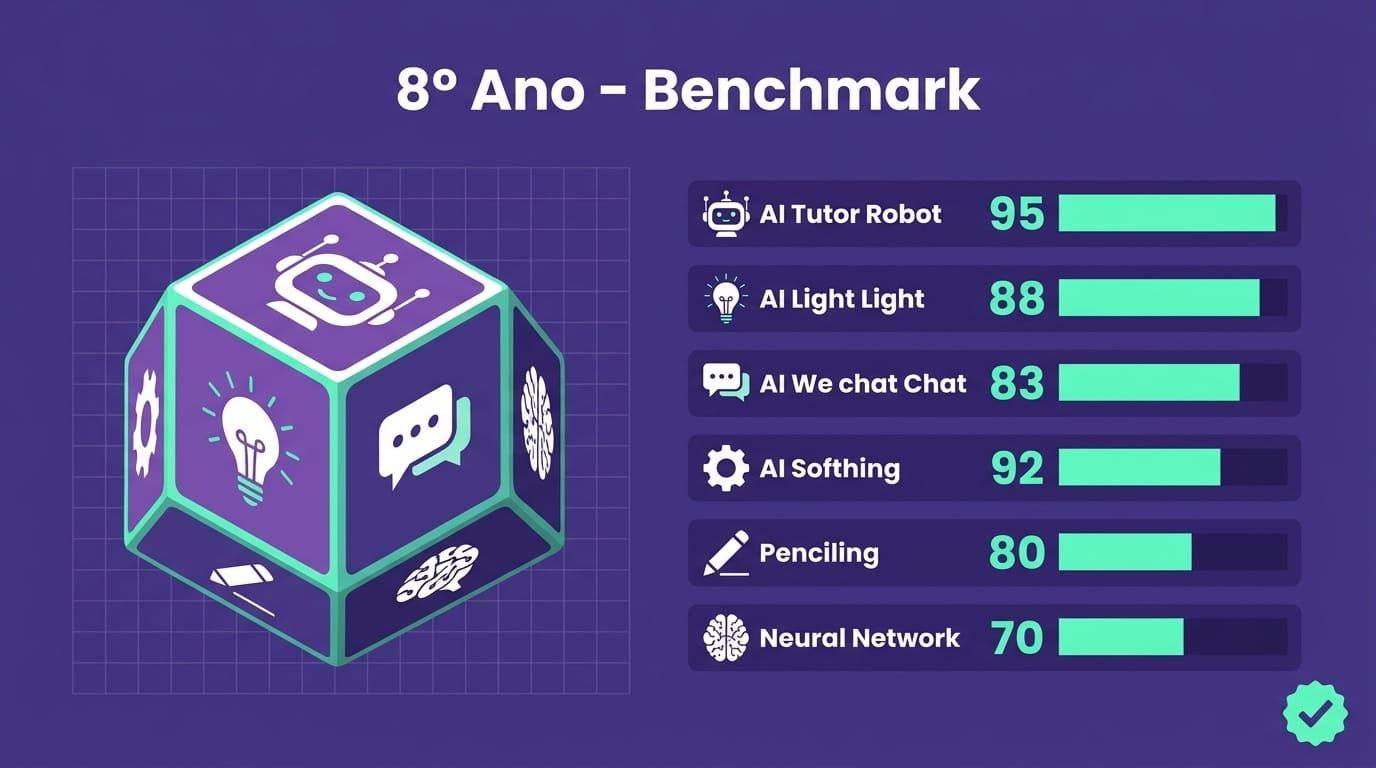
The practical takeaway: ChatGPT and Teachy lead for creating formal assessments. ChatGPT offers more flexibility; Teachy offers more built-in educational context. For interactive dynamics, Edupulses and gamification in education platforms like Gamefik complement the process by transforming static content into engagement experiences. Across 500+ schools, we've learned that the best results don't come from choosing one tool — they come from combining the right tool for each stage of the process.
Ready-made prompts by subject — copy, paste, and adapt
This is the heart of the guide. Each prompt below has been tested in ChatGPT and Gemini and follows an accessible prompt engineering structure any teacher can use: [Role] + [Task] + [Context] + [Format] + [Constraints].
A note from what I've learned testing hundreds of prompts with teachers from partner schools: the most common mistake isn't forgetting an element — it's being too generic within each one. "Math teacher" is a generic role. "6th-grade math teacher at a Title I school with 32 students, including 5 with IEPs and 3 English Language Learners" is a role the AI can actually work with. The more specific the role, the more useful the output.
English Language Arts (Middle School — 7th Grade)
You are a 7th-grade ELA teacher at a public middle school. Create an activity with 3 short-answer questions and 4 multiple-choice questions about identifying and analyzing figurative language (simile, metaphor, personification), aligned to Common Core standard CCSS.ELA-LITERACY.RL.7.4. Use excerpts from popular young adult novels and contemporary song lyrics as examples in the stems. Include an annotated answer key explaining why each option is correct or incorrect. Difficulty level: intermediate.
Field tip: a 7th-grade ELA teacher in an Atlanta-area middle school told us that when she used excerpts from current pop songs and bestselling YA novels in the question stems, the completion rate on the activity jumped noticeably. It sounds small, but when the prompt speaks the student's language, they read more carefully.
Mathematics (Elementary — 4th Grade)
Act as a 4th-grade math teacher. Create 6 word problems about multi-digit multiplication and division with whole numbers up to 10,000, aligned to Common Core standard 4.NBT.B.5 and 4.NBT.B.6. Problems should use everyday situations a 9-year-old relates to (buying items at a school store, splitting trading cards equally among friends, planning a birthday party). Include 2 open-response problems that require students to show their reasoning. Format: printable worksheet with space for student work.
Science (High School — 10th Grade Biology)
You are a high school Biology teacher. Create an investigative activity on Mendelian genetics for 10th-grade students, aligned to NGSS HS-LS3-3 and the Science and Engineering Practice of "Analyzing and Interpreting Data." The activity should contain: 1 case study about ABO blood type inheritance, 3 questions requiring students to construct and interpret Punnett squares, and 1 question on the ethical implications of prenatal genetic testing. Level: advanced. Include an assessment rubric with 4 criteria.
Social Studies (Middle School — 8th Grade)
Act as an 8th-grade Social Studies teacher. Design a group simulation activity about the Cold War, aligned to the C3 Framework standard D2.His.1.6-8 (analyzing connections among events and developments in historical contexts). The simulation should recreate a United Nations emergency session with 4 delegations (United States, Soviet Union, Cuba, a Non-Aligned Movement nation). Include: a briefing sheet for each delegation with historically accurate positions, 3 debate topics, rules of argumentation, and assessment criteria based on participation and use of historical evidence. Estimated time: two 50-minute class periods.
This type of prompt generates activities that move beyond rote memorization — and in practice it's what we hear most from teachers who want to get past the "answer the questions at the end of the chapter" model. The challenge is that the AI may generate oversimplified historical positions for the delegations. Always cross-check with primary sources before applying.
Science (Elementary — 5th Grade)
You are a 5th-grade science teacher. Create an activity about the water cycle and Earth's major ecosystems, aligned to NGSS 5-ESS2-1. Include a blank diagram of the water cycle that students label, 3 questions connecting weather patterns to ecosystems in different U.S. regions, and 1 take-home research question where students investigate the ecosystem closest to their own community. Format: printable activity sheet.
The logic behind every prompt follows the same pattern: the more context you give the AI, the less time you spend fixing the output. Note that all of them include the specific learning standard — and that's the difference between a prompt that generates generic material and one that generates usable material.
How to align AI-generated activities to Common Core and state standards
Generating a well-written, nicely formatted activity isn't enough. If it isn't aligned to your state's learning standards — whether that's Common Core, NGSS, C3 Framework, or a state-specific framework like TEKS (Texas) or SOLs (Virginia) — you're creating content that may not connect to your school's scope and sequence, the adopted curriculum, or standardized assessments.
This is a point where I see a lot of confusion — especially in schools that are just starting to use AI. Citing a standard code in the prompt doesn't guarantee alignment. The AI can generate content on the right topic but at the wrong cognitive level. I've seen activities that cited CCSS.MATH.CONTENT.7.SP.B.4 (interpreting data displays) and delivered questions with literal reading that any 4th grader could answer. Alignment is more than a tag — it's correspondence between what the standard demands and what the question actually assesses.
Alignment requires three checks:
1. Identify the standard before writing the prompt. Consult your state's standards framework or, for faster lookup, use tools like Common Core State Standards Initiative (corestandards.org), Achieve the Core, or UnboundEd. Insert the standard code (e.g., CCSS.ELA-LITERACY.RI.6.7) directly into the prompt. This forces the AI to contextualize the content — though it doesn't always get it right, which leads us to step 2.
2. Cross-validate the output. After the AI generates the activity, open the standard's full description and verify that each question actually targets that skill. A common error: you request an activity about "analyzing how visual and multimedia elements contribute to meaning" (CCSS.ELA-LITERACY.RI.6.7) and the AI generates questions that only test surface-level recall. The content is in the right topic area but at the wrong depth of knowledge.
3. Connect to broader competencies. Standards frameworks aren't just discrete skills — they include cross-cutting capacities like critical thinking, argumentation, and collaboration. If your science activity doesn't engage scientific reasoning or evidence-based argumentation, it may be technically aligned to the standard but misaligned to the deeper intent of the framework. Add to the prompt: "Include at least one question that requires students to construct an evidence-based argument."
This level of care might seem time-consuming, but in practice it adds about 3 minutes and prevents significant rework. Instructional coaches at schools in the Gamefik partner network report that adopting structured prompts with explicit standard codes reduced activity review time by roughly 40% across 500+ schools validated in Brazil and LATAM. The reason is simple: when the draft already arrives in the right register, review becomes fine-tuning instead of rewriting.
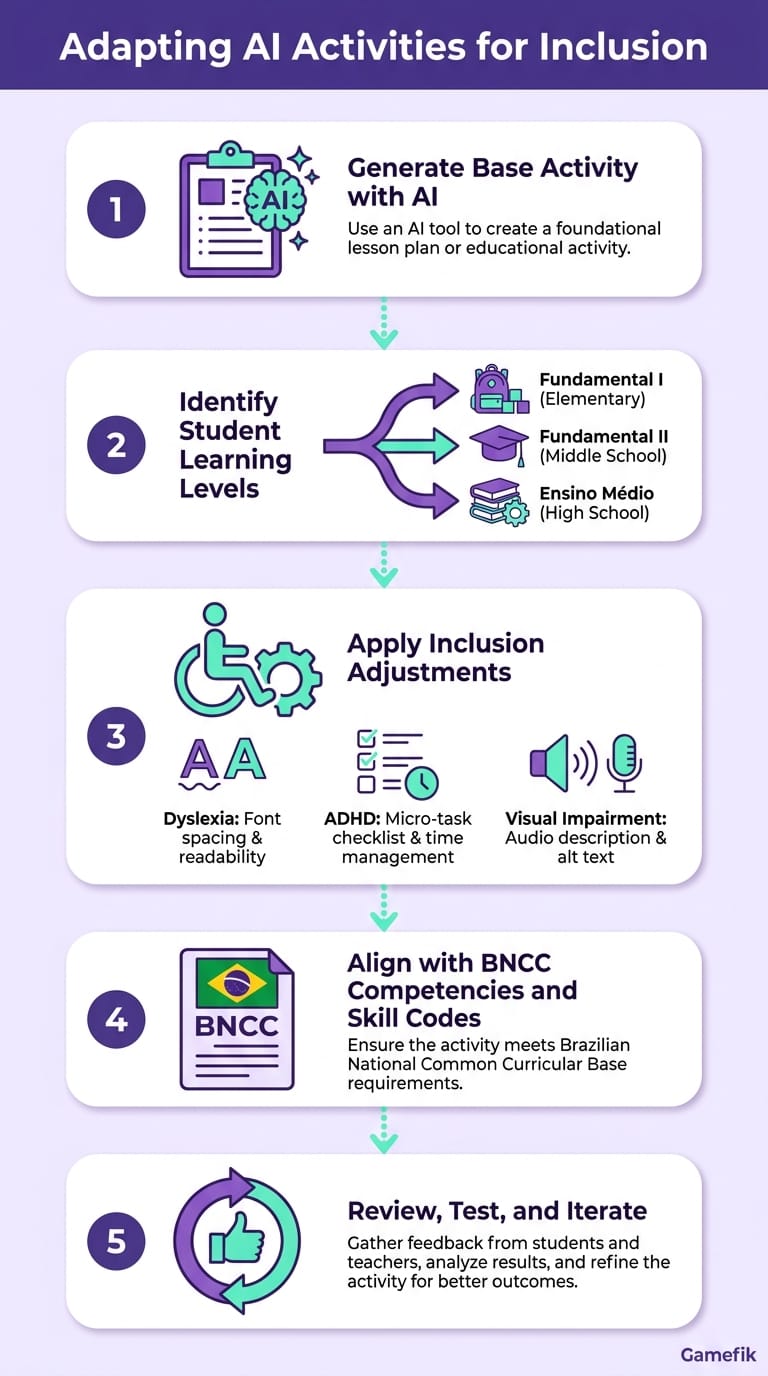
Adapting by grade band and for inclusive education
A math activity about fractions works in radically different ways in 4th grade and 8th grade. The AI doesn't make that distinction on its own — unless you instruct it.
Elementary (K–5): Instruct the AI to use simple vocabulary, short sentences (maximum 15 words per stem), concrete contexts, and visuals. Add to the prompt: "Use language appropriate for children ages [age]. Include illustrations or spaces for drawing. Avoid abstract terminology." For K–2, request activities with mandatory visual support — pictograms, emojis, or descriptive images. A lesson I've learned from working with elementary schools: if the stem has more than two sentences, 7–8-year-olds lose the thread. Tell the AI: "Each question stem should be a single sentence."
Middle School (6–8): Increase textual complexity and include questions that require inference, comparison, and argumentation. Ask the AI to mix formats: multiple-choice with justification, matching, primary source analysis, and short constructed response.
High School (9–12): Prioritize questions that mirror standardized test formats — SAT, ACT, AP exams, or state assessments. Instruct the AI: "Create questions in SAT-style format with a stimulus passage of up to 200 words, addressing [topic] with an interdisciplinary connection between [subject 1] and [subject 2]." A department chair at a college-prep high school in the Chicago suburbs shared a workflow that works well: she asks ChatGPT for SAT-style questions, deploys them through Gamefik as weekly missions, and uses the performance data to adjust her review plan before the exam. The entire cycle — from generation to actionable data — closes in under an hour.
Inclusive education: This is the most critical gap. No competing guide addresses how to adapt AI outputs for students with disabilities or learning differences. And here I need to be direct: AI doesn't solve inclusion on its own. It accelerates the mechanical part of adaptation, but the teacher — along with the special education team and any IEP or 504 plan provisions — remains irreplaceable for evaluating whether the adaptation makes sense for that specific student. Three practical guidelines:
- For students with dyslexia: Add to the prompt: "Use a sans-serif font, double line spacing, and stems no longer than 2 lines. Avoid double negatives. Bold key vocabulary words."
- For students with ADHD: Request activities broken into micro-tasks of 3–5 minutes each with progress checkboxes. Include: "Each question should be answerable independently, without needing to read the entire activity."
- For students with visual impairments: Request detailed text descriptions of any visual element and ask the AI to generate purely text-based activities or include instructions for tactile materials.
Adapting activities for inclusion isn't just an ethical responsibility — it's a legal obligation under IDEA (Individuals with Disabilities Education Act) and Section 504 of the Rehabilitation Act. In the UK, the SEND Code of Practice sets similar requirements; in Canada, provincial accessibility legislation applies. AI makes this process faster: what used to take 45 minutes of manual adaptation can be done in 5 minutes with a well-written prompt. But I'll repeat: the prompt doesn't replace the IEP, the conversation with the family, or the expertise of the special education teacher.
Post-AI pedagogical review checklist: 10 criteria before you bring it to class
The AI generates — you validate. That's the mantra. Never apply an AI-generated activity without running it through this filter. And I say this from experience: in workshops we facilitate for teachers at partner schools, the first exercise is always to take a ChatGPT-generated activity and find the errors. In 100% of workshops, participants find at least one factual or appropriateness problem — and that's what makes review non-negotiable.
- Factual accuracy: Are all information, dates, formulas, and concepts correct? (LLMs hallucinate — especially on historical facts and scientific data.)
- Standards alignment: Does the activity actually develop the learning standard indicated in the prompt?
- Age appropriateness: Are the vocabulary, length, and complexity suitable for the target grade level?
- Diversity and representation: Do the examples include diversity of gender, race, cultural background, and socioeconomic context?
- Stem clarity: Can a student understand what's being asked without additional explanation from the teacher?
- Difficulty progression: Do the questions move from simpler to more complex?
- Verified answer key: Is every answer in the key correct, and is each justification pedagogically sound?
- Accessibility: Can the activity be adapted for students with special needs with minimal adjustments?
- Practical feasibility: Does the estimated completion time fit within your class period? Are the required resources available?
- Originality: Is the activity different enough from material already available on open question banks that students could find via Google?
Print this checklist or save it on your phone. In 3 minutes of review, you prevent problems that would take an entire class period to correct. Instructional coaches and curriculum coordinators can use this same list to audit AI-generated activities before adding them to the school's assessment bank. In fact, some schools in the Gamefik network have already adopted a version of this checklist as institutional policy: no activity enters the official bank without all 10 items verified. The result is a more reliable question bank and a quality culture that benefits the entire team.
Free vs. paid: what actually changes in activity quality
The question every teacher asks: do I need to pay for good results? The honest answer: it depends on your volume and specificity. And I need to be transparent — as the founder of an EdTech company, it would be easy to say "pay for the tool and solve everything." But the reality is that a teacher with strong prompt skills can extract excellent results from free tools. Paid plans make a difference when volume increases or when you don't have time to refine.
What works well on free plans: ChatGPT (free version with GPT-4o mini), Google Gemini, and Canva Magic Write work well if you need 2–3 activities per week and you've developed your prompting skills. The cost is zero dollars but requires more refinement time — generally 2–3 rounds of adjustment per activity.
What changes on paid plans: Tools like ChatGPT Plus ($20/month), Teachy Pro (~$6–12/month), and district-level platforms like MagicSchool AI or Formative (pricing varies, often adopted institutionally) offer three concrete advantages. First: more powerful models that better understand complex prompts and generate more aligned activities on the first try. Second: integrated curriculum databases that reduce the work of citing standard codes manually. Third: print-ready formatting or integration with LMS platforms like Google Classroom and Canvas.
For a teacher creating 10+ activities per week, investing $10–20/month pays for itself in time saved. Internal data from Gamefik (2024) shows that teachers at partner schools who use structured AI tools save an average of 2 hours per week on planning — that's 8 hours a month redirected toward individualized student support. For a school with 30 teachers, that represents 240 hours monthly redistributed to what actually moves the needle: attention to the student.
One point that few mention: the real cost isn't just the tool subscription — it's the learning curve. A teacher at a rural school in West Virginia told us it took her three weeks to feel comfortable with ChatGPT, but that after that she could create in 10 minutes what used to take an hour. The right tool with zero training can generate more frustration than results.
How Gamefik transforms AI-generated activities into engagement experiences
Generating the activity is half the journey. The other half — and usually the harder one — is making the student want to complete that activity. This is where the concept of a gamified school comes in.
Gamefik isn't an AI activity-generation tool. It's a gamification in education platform that transforms any activity — including the ones you created with ChatGPT or Teachy — into experiences with points, leaderboards, missions, and rewards. The integration is straightforward: you create the activity in the AI tool of your choice, import it into Gamefik, and the platform adds the engagement layer.
The numbers back the approach. Internal 2024 data shows that 90% of students at partner schools demonstrate measurable improvement in engagement after implementation — and we're talking about a base of 100,000 students across more than 500 schools validated in Brazil and LATAM. Implementation takes an average of 1 week, with no need for complex tech infrastructure. Schools with limited connectivity — and yes, many of our partners are in communities where internet is unreliable — can run the platform because it was designed for real-world scenarios, not ideal lab conditions.
The practical workflow looks like this: Monday, you generate 5 review activities in ChatGPT using the prompts from this guide. Tuesday, you import them into Gamefik as weekly missions. Students complete them at their own pace, earn points, and unlock achievements. You track performance in real time through the platform dashboard and identify who needs intervention without waiting for the end-of-quarter exam. Same activities — completely different experience.
A case that illustrates this well: a middle school in the greater Houston area had a homework completion rate of around 55%. After implementing Gamefik with AI-generated activities transformed into missions with rewards, the rate rose to 82% within two months. The activity was the same. The delivery mechanism changed.
To learn more about how this engagement layer works in practice, see our guide on student engagement strategies.
Ethical considerations and limitations you need to know
AI is not a panacea. And I believe any guide that doesn't dedicate serious space to limitations is doing a disservice. Three real risks you must manage:
Factual hallucination. Language models invent information with confidence. In an internal test, we asked ChatGPT for a history activity about the Civil Rights Movement and it included an incorrect date for the Montgomery Bus Boycott. In science, chemical formulas can come back wrong. In math, we've seen answer keys with incorrect calculations on probability problems — the kind of error a sharp student catches and that undermines the teacher's credibility. The review checklist from the previous section exists for this reason — skip it at your own risk.
Bias in examples. AI tends to generate examples that reflect the biases of its training data. In ELA activities, male characters appear more frequently in protagonist roles. In math, word problems tend to default to middle-class suburban contexts — something that doesn't resonate with students in under-resourced schools. Explicitly request in the prompt: "Include examples with diversity of gender, race, and socioeconomic context. Consider that students come from varied backgrounds."
Over-reliance. If the AI creates everything, the teacher loses intimacy with the instructional material. In practice, what we see is that the teachers who benefit most from AI are precisely those who already had strong content knowledge — because they can spot when the output is wrong and know how to refine it. The recommendation is to use AI as a draft accelerator, not as the final author. You know your students. You know that your third-period class needs more time with the reading passages and that Marcus learns better with visual models. No AI knows that.
Data privacy. Never input personal student data into AI prompts (names, grades, IEP details, behavioral notes). Always use fictitious data for personalization. Check the tool's privacy policy — especially regarding FERPA compliance in the U.S. (and COPPA for students under 13). In the UK, GDPR applies; in Canada, PIPEDA and provincial privacy legislation govern student data. Tools that store prompts on servers without adequate data protection agreements can create legal liability for the school or district. When in doubt, consult your district's data privacy officer before institutionalizing AI use.
FAQ — Frequently asked questions about AI for creating classroom activities
What are the top 3 AI tools for creating classroom activities?
The three most widely used tools by K–12 teachers in 2024–2025 are ChatGPT (OpenAI), Google Gemini, and MagicSchool AI (with Teachy growing in international markets). ChatGPT leads in flexibility and response quality for complex prompts. Gemini stands out for its seamless integration with the Google ecosystem (Docs, Slides, Classroom). MagicSchool AI is purpose-built for education, with built-in standards alignment and teacher-specific workflows.
Which AI tools for creating activities are free?
ChatGPT (free tier with GPT-4o mini), Google Gemini, and Canva Magic Write all offer free plans that allow teachers to create classroom activities at no cost. ChatGPT's free plan has a message limit per period; Gemini is unlimited for basic use; Canva allows 25 free Magic Write uses per month. For intensive use (more than 10 activities per week), paid plans like ChatGPT Plus ($20/month) or MagicSchool AI offer better cost-effectiveness through time saved.
Is there an AI that creates activities already aligned to Common Core?
Yes. MagicSchool AI and Teachy are among the most complete in this regard, as they were designed with curriculum standards integrated into their databases. When you select a grade and subject, standards are suggested automatically. ChatGPT and Gemini can also generate aligned activities, but require the teacher to insert the standard code manually in the prompt and cross-validate the output. The recommendation is to always verify alignment using the pedagogical review checklist, regardless of the tool used.
How do I know if an AI-generated activity is pedagogically sound?
Apply the 10-criterion checklist presented in this guide: verify factual accuracy, standards alignment, age appropriateness, diversity in examples, stem clarity, difficulty progression, answer key accuracy, accessibility, practical feasibility, and originality. No AI replaces teacher review — the model generates the draft, you ensure the final quality.
Can AI-generated activities be used for students with IEPs or 504 plans?
AI can significantly accelerate the adaptation process, but it cannot replace the professional judgment of the special education team. Use specific prompt instructions — for example, requesting simplified language, shorter stems, visual supports, or micro-task formatting — and then verify that the output meets the specific accommodations outlined in each student's IEP or 504 plan. Always consult with the special education coordinator before applying adapted AI-generated materials.
Next step: turn your activities into experiences that drive engagement
You now have ready-made prompts, a real tool benchmark, and a checklist that no other guide offers. What's missing is the layer that transforms standalone exercises into a learning journey that students actually want to complete.
Gamefik does exactly that. With implementation in 1 week and no need to change your existing curriculum materials, you add gamification to any activity — the ones you built with AI or the ones you've been using for years. Over 500 schools and 100,000 students prove that measurable engagement isn't a slide-deck promise; it's a real metric.
Visit gamefik.com and see how to transform your activities into experiences your students will want to complete.