
The top free AI courses for teachers in 2026 include Google's Teachable Machine, Microsoft's AI for Educators, ISTE's AI in Education, and Coursera's AI for Everyone. All offer certificates. The right choice depends on your level: beginners start with a short Microsoft or Google module; teachers ready to apply AI in the classroom go deeper with ISTE or Coursera. What separates teachers who benefit from those who forget the course isn't the platform — it's running one real prompt on a lesson plan the week after you finish.
You've probably already seen that link in your school's staff chat — "free AI course for teachers, grab it now" — and wondered: is this actually worth two hours on a Tuesday night, let alone twenty? The honest answer is: it depends on which course and where you are right now. A first-year teacher who has never opened ChatGPT, a veteran educator already using AI to draft rubrics, and an instructional coach trying to build a team-wide strategy should not start in the same place. This guide compares the strongest free AI courses available to US, UK, and Canadian teachers in 2026, gives you real time commitments, and — most importantly — tells you exactly what to do the week after you earn the certificate. Because a certificate filed away in a Google Drive folder changes nothing in your classroom. In ten years of working alongside 500+ schools validated in Brazil and LATAM, that is the single most expensive lesson we have learned: the problem is almost never the course. It is the vacuum that follows it.
Which free AI course for teachers matches your profile?
The right course is not the most comprehensive one. It is the one that fits your schedule and your current starting point. In the school partnerships we track, teachers who start at the wrong level drop out within the first week — beginners who land in an intermediate module feel lost, while experienced users who sit through an intro module feel like they wasted a weekend. Here is a profile-by-profile breakdown.
If you are a beginner and want to understand what AI actually is without drowning in jargon, start with Microsoft's AI for Educators (available through Microsoft Learn). The introductory AI modules run 10–20 hours depending on the path, are fully self-paced, and the certificate generates automatically when you complete the assessments. A fifth-grade teacher in a rural Ohio district told us she only committed because the first module fit into "three evenings after my kids went to bed" — and that friction-to-entry point is exactly what makes it work for most teachers.
If you have already experimented with AI and want to apply it to your teaching practice, the stronger move is ISTE's AI in Education course or Coursera's AI for Everyone (Andrew Ng, audit free). Both shift the focus from "what is a large language model" to "how do I use this responsibly in a 7th-grade ELA class." ISTE in particular is built with K-12 standards alignment in mind, which matters when you are defending a new approach to your department chair.
If you are an instructional coach or curriculum coordinator, combine two moves: complete Google's AI for Educators program (which carries strong pedagogical framing and integrates with Google Workspace tools most US and UK schools already use), then use the Microsoft Learn catalog to build a sequenced pathway for your team. Several curriculum directors we have worked with structured their entire PD calendar around Google's course precisely because the certificates were already recognized by their district's HR system — it cut months of approval paperwork.
Here is the verified comparison as of the publication date (July 2026). Platforms update cohorts frequently, so always confirm hours at the point of enrollment:
| Course | Hours | Certificate | Level | Best For |
|---|---|---|---|---|
| Microsoft AI for Educators | 10–20h | Microsoft Learn | Beginner | First contact with AI |
| Google AI for Educators | 15–25h | Google for Education | Beginner / Intermediate | Classroom application, Google Workspace users |
| ISTE AI in Education | 20–40h | ISTE | Intermediate | Pedagogical depth, K-12 standards focus |
| Coursera – AI for Everyone (Andrew Ng) | 20–30h¹ | Coursera (audit free) | Beginner / Intermediate | Conceptual foundation |
| MIT RAISE – AI Literacy for Educators | 20–40h | MIT RAISE | Intermediate | Research-backed pedagogy |
¹ Coursera audit is free; a verified certificate requires a paid upgrade. Hours reflect the core course without optional materials. Confirm current cohort hours at enrollment.
Notice that every row carries a concrete hour range and a footnote where ambiguity exists. If you are using this certificate toward recertification or salary advancement, you need the actual hours before you register — not an approximation.
How enrollment works and what each course looks like in practice
The most common objection is not "the content is too hard." It is "I don't have time." So here is the practical picture, which moves faster than most teachers expect.
Microsoft AI for Educators: go to Microsoft Learn (learn.microsoft.com), create a free account with your work or personal email, search "AI for Educators," and enroll. Self-paced modules have no fixed start date. The certificate issues automatically on completion. A 10-hour module can realistically be done across three evenings.
Google AI for Educators: access via the Google for Education training center. If your school uses Google Workspace for Education, you may already have a linked account. Completion unlocks a shareable badge that integrates with LinkedIn and most district PD tracking systems.
ISTE AI in Education: enrollment opens by cohort. Check iste.org for current windows. Unlike self-paced options, ISTE courses sometimes include live sessions and community discussion — higher time cost, higher depth of application.
Coursera – AI for Everyone: create a free Coursera account, enroll in audit mode (free), and access all video and reading content. Graded assignments and the certificate require a paid plan. For most teachers, the audit content is sufficient to build conceptual fluency.
Requirements across all of these: a computer, tablet, or phone with reliable internet. No coding background required. If you can send an email and navigate a browser, you can complete any of these courses. One practical caveat the courses themselves never mention: if your school's network blocks AI tools — which is still common across many US districts — you will need to practice the hands-on exercises on your personal device using mobile data or home Wi-Fi, because the learning management system usually loads fine on school networks but the AI tools you are testing afterward often do not.
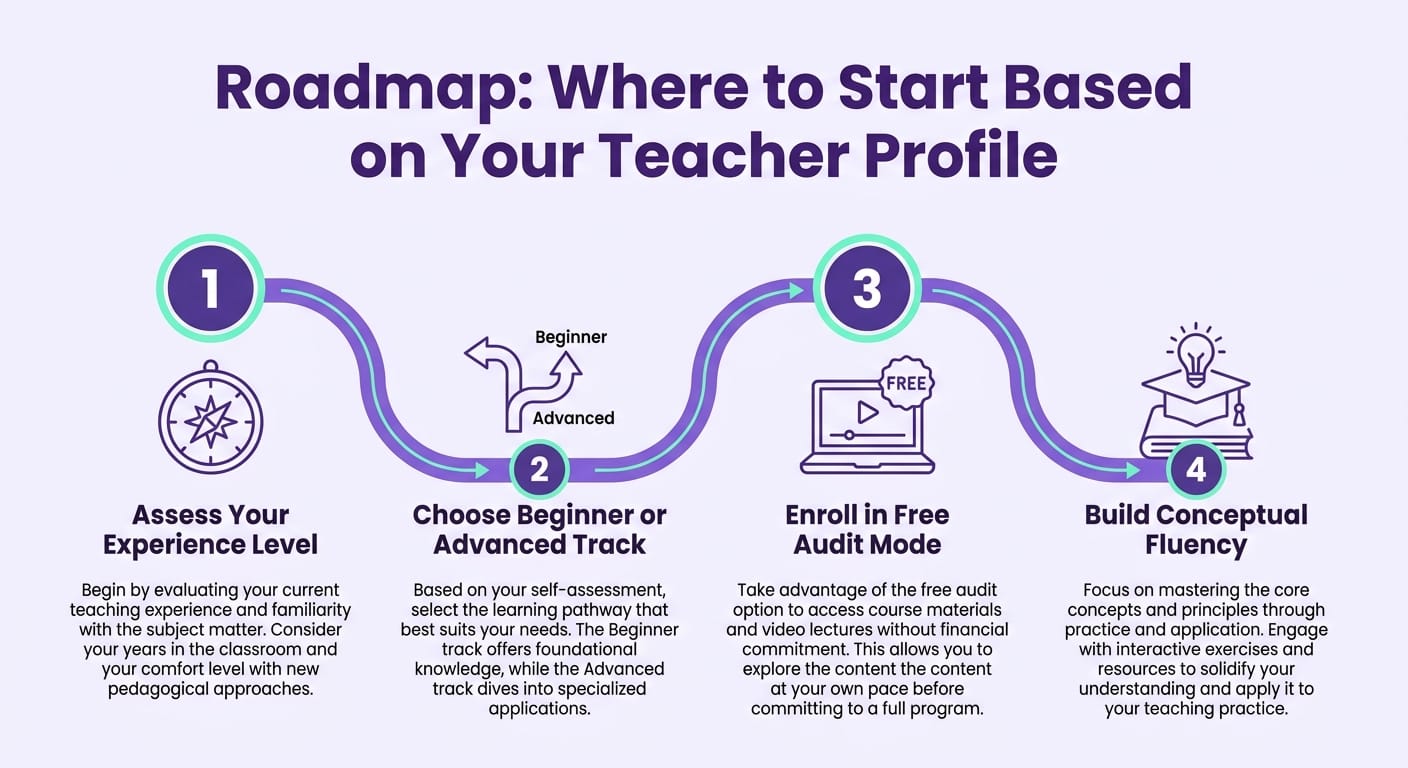
Now for the second real objection — the one nobody says out loud: "I already did one of these courses and never used anything I learned." That is the norm, not the exception. And it is exactly what the next section addresses.
What to do after the certificate (the part almost no one does)
Across 500+ schools validated in Brazil and LATAM, Gamefik's research found that only 23% of teachers who complete an AI course apply any tool in their classroom within the 30 days that follow. The other 77% file the certificate and let the school year swallow the learning. The gap between those two groups is not talent or available time — it is a concrete application plan executed immediately after the course ends. Across those schools, the consistent finding is that application does not come from motivation; it comes from low friction. The smaller the next step after the certificate, the higher the chance the new habit sticks.
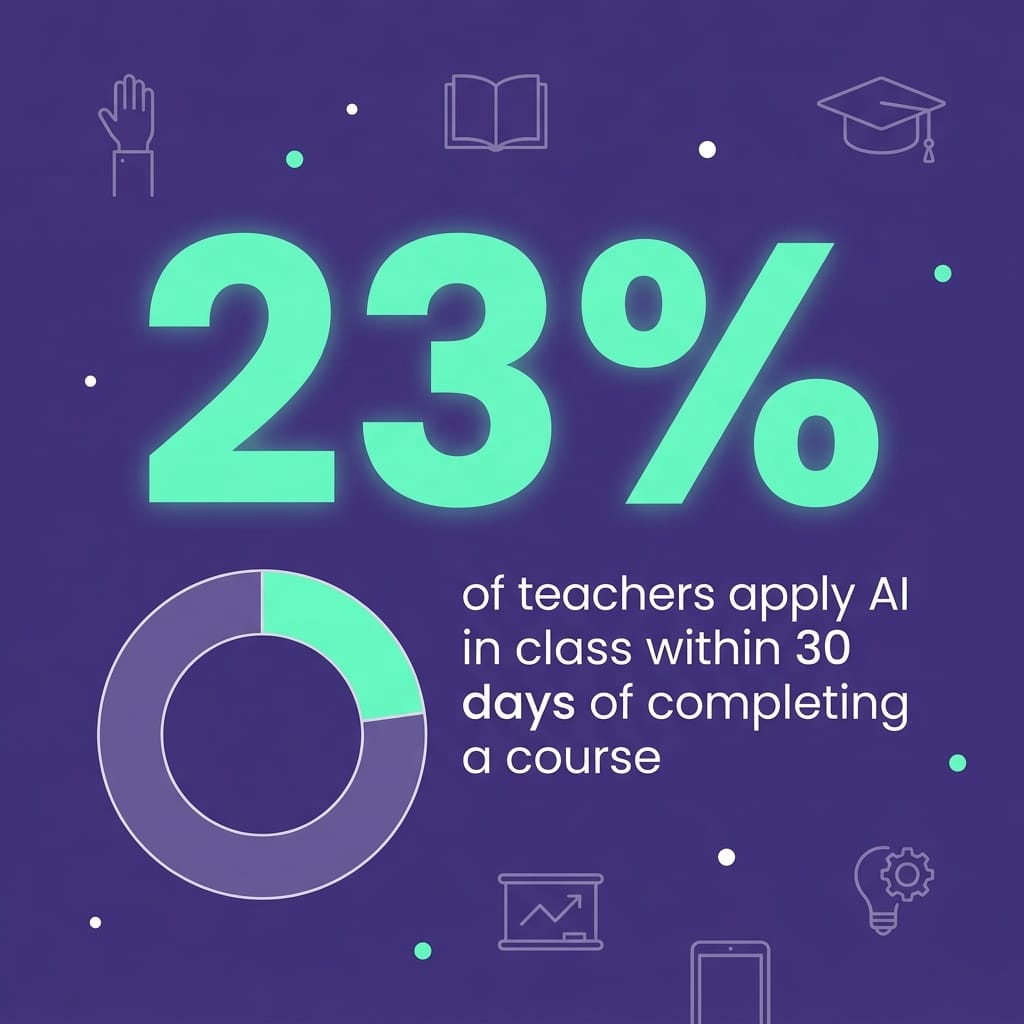
Here is a three-action roadmap that moves you into the 23% — it works regardless of grade level or subject:
1. Within the week after your course, run one single prompt on a real lesson plan. Not ten. One. A middle school history teacher asks the AI for three versions of a Civil Rights Movement activity differentiated by reading level. A high school algebra teacher generates five linear equations problems with worked solutions — what used to take a Saturday morning takes twelve minutes. The guide to artificial intelligence for teachers includes ready-made prompt templates so you are not starting from a blank screen. The goal: one lesson prepared with AI within seven days of your certificate.
2. Record the result with a number. Time yourself. If building a quiz used to take 45 minutes and the AI got you there in 10, write that down. In the schools we track, teachers who use AI for lesson prep and feedback save an average of two hours per week — but they only recognize that saving when they measure it. Without a record, the efficiency is invisible and the habit does not form. If grading is your biggest time drain, the step-by-step guide on AI for teachers walks through the time savings by class size.
3. Share one concrete application with your instructional coach or department head within 30 days. Bring the actual artifact — the differentiated lesson the AI helped you build, the minutes you saved — to a PLC meeting or department check-in. This does two things: it turns individual learning into school-level knowledge, and it answers the third objection, which is "my district doesn't value this." When application becomes an in-house case study, the certificate stops being a line on your resume and becomes an evidence-backed argument for your professional development record. Here is the field truth: the teacher who walks into a staff meeting with a specific time number changes the conversation entirely — administration stops treating AI as a trend and starts treating it as a legitimate productivity tool.
A word on certificates and professional development credit: Google, Microsoft, and ISTE certificates are broadly recognized, but the exact rules vary by state, district, and collective agreement in the US, UK, and Canada. Before counting those hours toward recertification or a pay-scale step, confirm with your district's HR or PD coordinator that the specific certificate is approved. Completing the course is easy; making sure it counts requires that one verification step — and we have seen teachers accumulate 150+ hours of unrecognized PD simply because no one checked the district's approved-provider list first.
Why are major technology companies and institutions investing in teacher AI literacy? Because AI is already in the classroom whether schools have a policy or not. The training exists to ensure that use is pedagogical and responsible, rather than students submitting AI-generated work unchecked. If you want to go deeper than a single certificate, the overview of artificial intelligence for teachers maps the full landscape of classroom-ready tools.
Where Gamefik fits — honestly
Let's be precise about what each layer solves. The free courses above — Microsoft, Google, ISTE, Coursera — teach you the concepts and give you the credential. Generative AI tools like ChatGPT handle the lesson preparation problem: drafting exercises, rubrics, assessments, and differentiated materials in minutes.
Gamefik addresses a different problem that no course resolves on its own: student engagement. A perfectly structured AI-generated lesson plan still falls flat if students are not invested in doing the work. In schools that combine our gamification in education methodology with AI-assisted lesson prep, 90% of students show measurable improvement in engagement (Gamefik internal research, 2024). And implementing a gamified school framework takes less than a week of onboarding — not a semester-long pilot. The key distinction is that the AI adoption becomes school-wide rather than dependent on a single motivated teacher who took the course alone. In ten years of field work, the pattern that fails most reliably is exactly that: one engaged teacher learns the skill, applies it solo, and when that teacher transfers or changes schools, the knowledge leaves with them.
The stack, clearly separated: take the free course to build fluency, use AI tools to prepare stronger lessons faster, and bring in Gamefik when the challenge shifts from "how do I create better materials" to "how do I get students to consistently engage with those materials." These are complementary layers, not competing products. Gamefik does not replace an AI course — it solves the layer that comes after, when the lesson is ready and the classroom still needs to show up for it. Request a demo for schools to see how the two work together in a real district context.
Frequently asked questions
What is the best free AI course for teachers who are complete beginners? Microsoft's AI for Educators is the lowest-friction entry point: self-paced modules of 10–20 hours, no fixed enrollment window, and a certificate that generates automatically on completion. Once you have the basics, move to ISTE's AI in Education for deeper classroom-application focus.
Do these free AI courses count toward professional development hours? Many do — but the rules vary by state, district, and collective agreement in the US, UK, and Canada. Google, Microsoft, and ISTE certificates are widely recognized, but confirm with your district's HR or PD coordinator before counting hours toward recertification or a salary step.
Do I need coding or technical skills to take these AI courses for teachers? No. None of the recommended free AI courses for K-12 teachers require any programming knowledge. You only need a device with internet access and basic web navigation skills. The focus is pedagogical use, not technical development.
Start the course — but don't stop there
The certificate is the beginning, not the destination. Choose the course that matches your level today, run one AI prompt on a real lesson within the following week, and record what it saves you. If your challenge has shifted from "preparing better lessons" to "getting students to actually engage with them," schedule a demo for your school at gamefik.com and see how gamification in education and AI work together in a real K-12 classroom — not a case study, a live school day.